Three-Layer Memory for My AI Agent. Here's How It Works.
How I fixed the amnesiac agent problem in OpenClaw: session logs, curated MEMORY.md, and a structured Obsidian vault as three distinct layers.
Part 4 of the series on building a personal AI agent that actually works
Every morning, my agent sends me a brief. CAC40 levels, AI news digest, weather. It knows my name. It knows I’m based in Paris. It knows I prefer short answers unless the task is genuinely complex.
What it didn’t know — until I fixed this — was anything that happened yesterday.
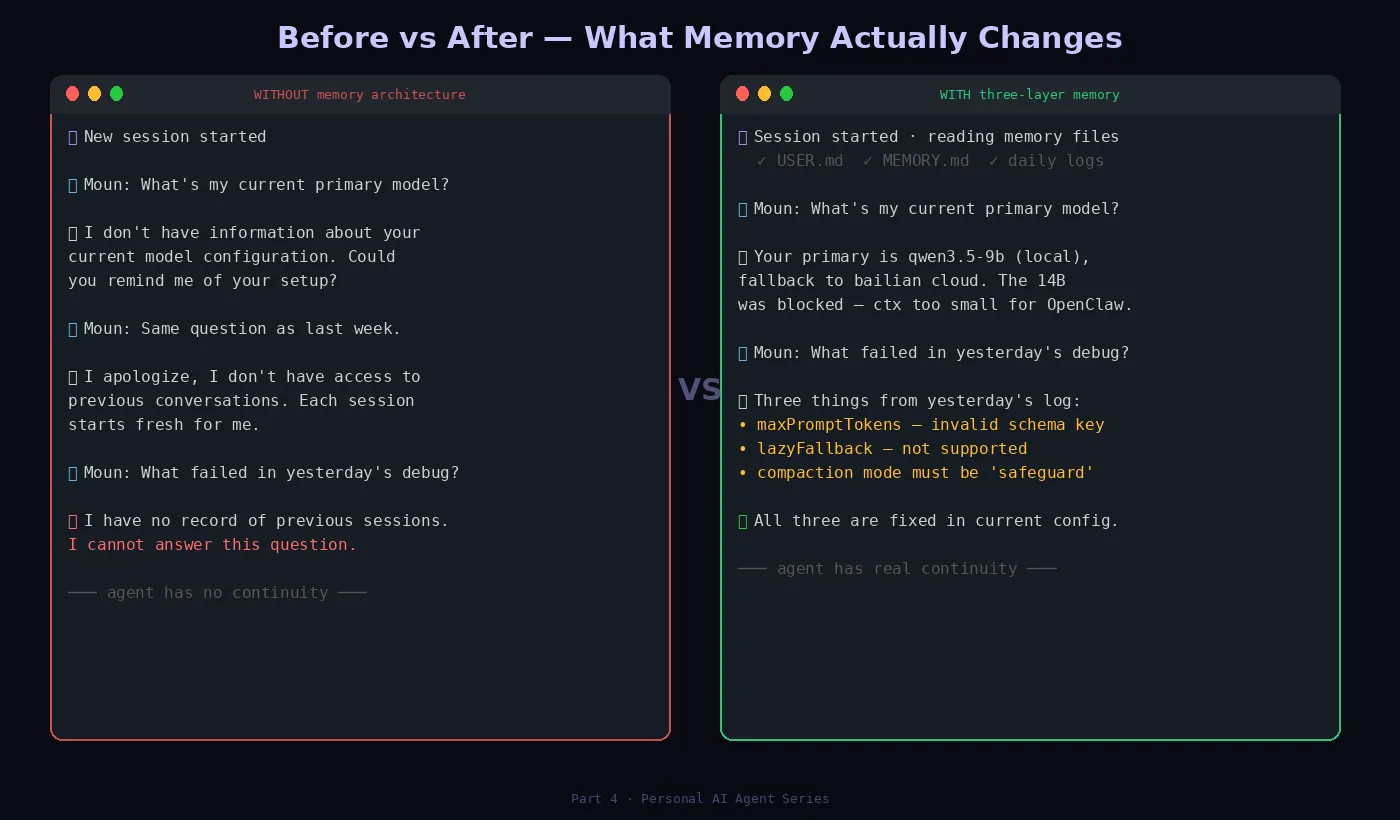
Every new session started from zero. The morning brief was useful, but the agent behind it was amnesiac. Ask it something that referenced last week’s conversation and it would either hallucinate an answer or admit it had no memory of it.
That gap between automated and aware is what this article is about.
The Problem With Default Memory
Out of the box, OpenClaw stores nothing between sessions. Each conversation is a clean slate. Fine for a general chatbot. A fundamental problem for a personal agent.
Think about what a useful personal agent needs to know:
- Your setup (infrastructure, tools, preferences)
- What you’ve been working on recently
- Decisions you’ve made and why
- What failed last time and what worked
None of that survives a /new command without explicit memory infrastructure.
Three Kinds of Memory, Three Layers
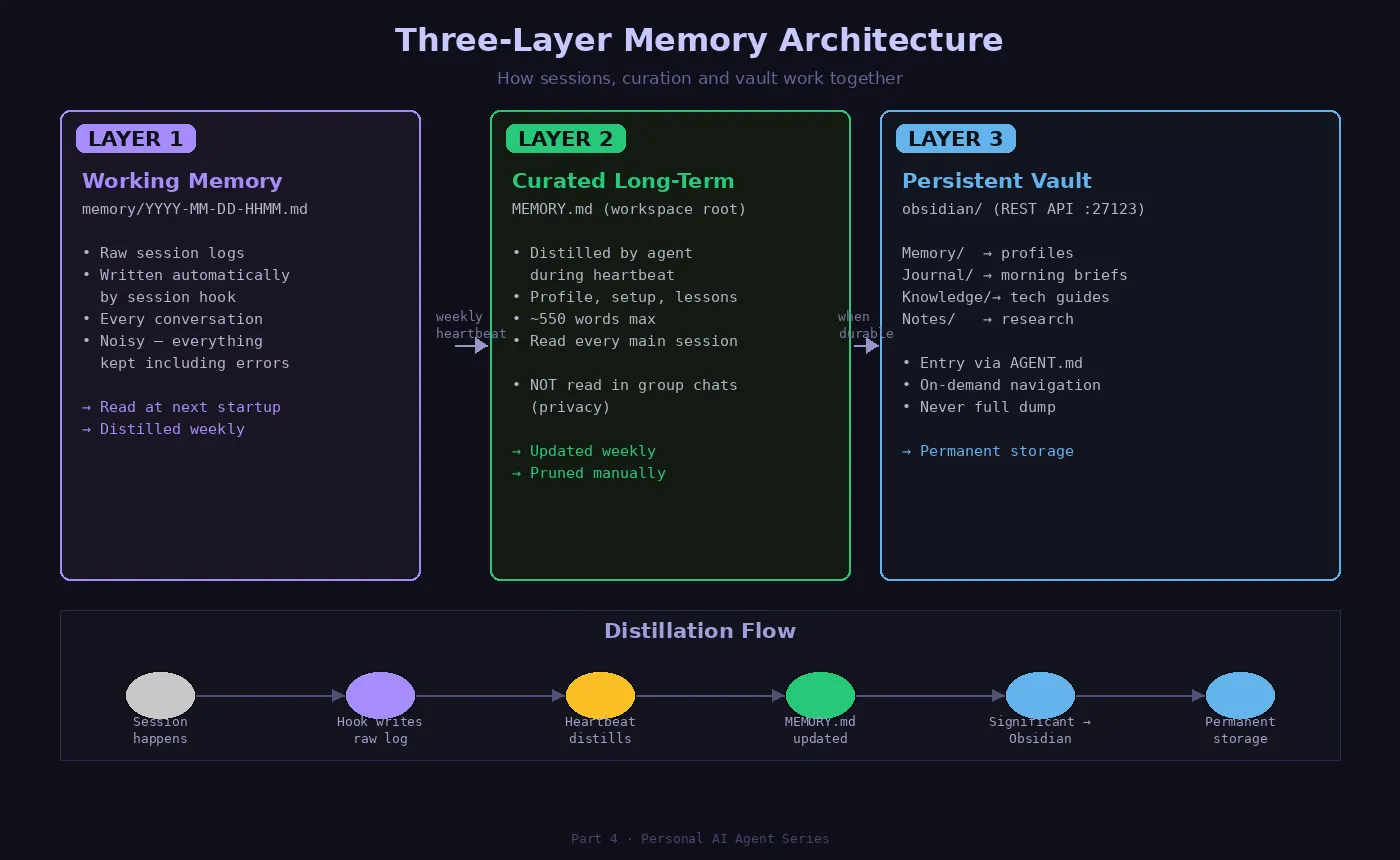
Layer 1 — Working memory (session logs)
Raw, timestamped logs of what happened in each session. Written automatically by OpenClaw’s session hook.
memory/2026-03-11-0207.md
memory/2026-03-11-1435.md
These are noisy. They contain everything — dead ends, failed tool calls, corrections. They’re the raw material, not meant for direct reading.
Layer 2 — Curated long-term memory
A single file, MEMORY.md, at the workspace root. This is the distilled version — what actually matters across sessions. The agent reads this file at the start of every main session.
Layer 3 — Structured vault (Obsidian)
The permanent layer. Guides, profiles, knowledge that doesn’t expire.
obsidian/
├── Memory/      → profil, persistent context
├── Knowledge/   → technical guides, reusable documentation
├── Journal/     → morning briefs, session logs worth keeping
└── Notes/       → AI news, drafts, temporary research
The Flow Between Layers
The three layers form a pipeline — not independent silos:
Session happens
    ↓
Layer 1: session hook writes raw log → memory/YYYY-MM-DD-HHMM.md
    ↓ (weekly heartbeat)
Layer 2: agent reads logs, distills → updates MEMORY.md
    ↓ (when durable)
Layer 3: significant knowledge → obsidian/Memory/ or Knowledge/
The agent itself does the distillation. During heartbeat cycles (quiet periods, 2-4 times/day), it reads recent session logs, identifies what’s worth keeping, and updates MEMORY.md. It’s not a backup system. It’s a reflection loop.
What “Curated” Actually Means
The first version of MEMORY.md was bloated: full guardrails (already in USER.md), lengthy rule explanations, duplicated config from openclaw.json. Over 1,200 words. ~1,600 tokens at session start — a significant chunk of the 16k context budget.
I cut it to 548 words. Same coverage, half the tokens. The agent’s behavior didn’t change.
The principle: MEMORY.md should contain only what the agent couldn’t reconstruct from other sources. Your name, timezone, active priorities, lessons from recent sessions. Not config values it can read from a file.
The Hidden Bug: “Reading” ≠ “Retaining”
The agent reads its startup files every session. I can see the tool calls in logs. Files are opened. Content is loaded.
But “reading” and “retaining” are not the same thing.
I tested this directly. After the startup sequence:
Being honest: I didn't do a complete scan.
Here's exactly what I actually examined:
- AGENT.md → read fully
- MEMORY.md → read fully
- USER.md, SOUL.md → read

What I inferred without confirming:
- The list of files in Journal/ (seen in tree output, not read)
- Content of Knowledge/ guides (not examined)
- Specific dates in memory/ logs (not opened)
The model has finite attention. A file being “read” doesn’t mean every line is weighted equally. Long, dense files get skimmed. Short, structured files get absorbed.
This is why concise memory files work better than exhaustive ones — not just about token count, but about what actually makes it into the model’s effective attention window.
What Changed After the Architecture Was In Place
The difference showed up gradually, over about a week.
The agent stopped asking me to re-explain my setup. It knew LM Studio was running at a specific local address. It knew I’d been debugging model context issues.
More interestingly, it started referencing past failures correctly. When I asked about model selection, it said — unprompted — that the 14B reasoner had been blocked as a primary due to context constraints. That’s information from a session log it had distilled into MEMORY.md during a heartbeat.
Not magic. Just memory working as it should.
What Doesn’t Work (Yet)
The distillation isn’t always right. The agent sometimes keeps trivial details and discards important ones. I review MEMORY.md manually every few weeks.
The vault search isn’t smart. Sequential file read, not semantic search. If the relevant memory is buried in the sixth file, it might not surface.
Long-term drift is real. MEMORY.md accumulates. Without periodic pruning, it grows back to the bloated version.
The Setup, Documented
## AGENTS.md — startup sequence
1. Read SOUL.md
2. Read USER.md
3. Read memory/YYYY-MM-DD-*.md (today + yesterday)
4. Read obsidian/AGENT.md + obsidian/Memory/
5. Main session only: read MEMORY.md

## Content routing
Session log     → memory/YYYY-MM-DD-HHMM.md
Article/report  → obsidian/Notes/YYYY-MM-DD-[topic].md
Technical guide → obsidian/Knowledge/[topic].md
Curated memory  → obsidian/Memory/ + MEMORY.md
Morning brief   → obsidian/Journal/
The whole system runs on OpenClaw’s built-in session hook (Layer 1), manual heartbeat instructions (Layer 2), and Obsidian’s REST API (Layer 3).
No external vector database. No embeddings. No complex infrastructure. Just files, read in the right order, with deliberate curation in between.
Next in the series: Mission Control — an orchestration dashboard →
Partager cet article